



If you want a free cybersecurity learning path that does not start with a credit card, this seven-week roadmap strings together free courses from Harvard’s CS50 team, Professor Messer, freeCodeCamp, Microsoft Learn and others. It is written for students, career changers and IT staff who want a structured start. It is an introduction, not a shortcut to a job, and it marks clearly where free learning ends and paid exams begin. Links were checked on 24 October 2026.
Why follow a structured cybersecurity roadmap for beginners?
Most beginners stall because they hop between tutorials. Security draws on networking, operating systems, scripting and risk thinking, so order matters: it helps to know what a packet is before analysing one, and what a file permission is before studying privilege escalation.
Benefits: the sequence is free to follow, each week ends with a hands-on exercise, and the steps run from concepts to infrastructure to practice.
Limitations: several courses below are longer than a week, so you will study selected sections. Free videos do not give you a professional certification, and nothing here guarantees a job.
The 7-week free cybersecurity learning path
Plan on roughly 8–10 hours a week. That figure is a planning assumption, not a measured course length.
Week 1: Cybersecurity fundamentals.
Start with CS50’s Introduction to Cybersecurity, taught by David J. Malan. It covers securing accounts, data, systems and software, plus privacy. Watch lectures 0–2 this week and keep lectures 3–4 for a catch-up weekend.
- Practise: turn on multi-factor authentication for your email, set up a password manager, then explain hashing versus encryption in your own words.
- By Sunday: describe phishing, brute-force attacks and the basic defences.
- Cost: You can access the course materials at no cost through its OpenCourseWare program. However, if you want to submit assignments and receive personalized feedback, you will need to create an account on edX. A verified certificate is a separate paid option ($449 on Harvard Online when checked).
Week 2: Networking.
Use the Free CCNA v1.1 200-301 playlist from Jeremy’s IT Lab. It has 126 videos, so pick only the lessons on network basics, the TCP/IP model and IP addressing. NetworkChuck also published a free CCNA series, but an original link could not be verified, so it is not linked here.
- Practise: find your own IP address, default gateway and DNS server, then trace a request with
ping,traceroute(tracerton Windows) andnslookup. - By the end of Sunday, be able to describe how IP addresses identify devices, how ports direct network traffic, how protocols govern communication, and how DNS translates domain names into IP addresses.
- Cost: the videos are free. The CCNA is a paid Cisco exam you do not need for this roadmap.
Week 3: Linux.
Study freeCodeCamp’s beginner-friendly Linux crash course, which includes practical lab exercises and runs for more than two hours. The announcement post lists files and directories, links, permissions, grep, user accounts and root access, with free labs.
- Practise: in a virtual machine, create a user, restrict a folder with
chmod, and search a log file withgrep. Our Linux command games make good extra drills. - By Sunday: move around the terminal and read a permission string such as
rwxr-x---.
Week 4: Security fundamentals.
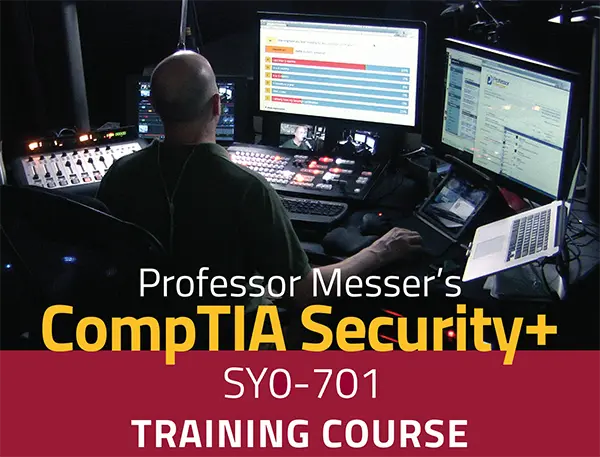
Image Credit: image taken from professormesser.com
Work through Professor Messer’s SY0-701 Security+ course: 121 free videos, about 15 hours in total. Do not try to finish it this week; take Sections 1 and 2, covering general security concepts and threats.
- Practise: write a one-page threat model of your home network: assets, likely threats and three controls.
- By Sunday: use terms like the CIA triad, vulnerability and mitigation correctly.
- Cost: the videos are free. Course notes, practice exams and the Security+ exam voucher are paid, and the exam itself is a separate CompTIA product.
Week 5: Ethical hacking.
Watch freeCodeCamp’s Hands-On Cybersecurity and Ethical Hacking – Full Course by Sunny Dimalu (the announcement calls it a four-hour watch). It covers Kali Linux basics, Nmap, Wi-Fi security with Aircrack-ng and Wireshark.
- Practise: install Kali in a virtual machine, scan only your own lab machine with Nmap, and capture traffic on your own network in Wireshark.
- Safety: test only systems you own or have written permission to test, and try the Wi-Fi material only on your own router. You can build your practical cybersecurity skills using authorized training environments like TryHackMe and Hack The Box. Review their latest free-plan offerings to see which labs and learning resources are available without a paid subscription.
- By Sunday: describe a basic scan-and-analyse workflow and why authorisation comes first.
Week 6: Python, scripting and cloud security.
The official Python Tutorial is free but written for people who already program, so beginners should start with Automate the Boring Stuff with Python, free to read online. Its chapters on reading and writing files and on CSV and JSON are the useful ones. For cloud, AWS lists free courses on its security training page, including “AWS Security Best Practices: Overview” (1.5 hours).
- Practise: write a script that reads a sample login-events file and counts failures per username.
- By Sunday: run a simple Python script and summarise, in a page, how a cloud provider’s security controls work.
Week 7: Microsoft security fundamentals.
Use Microsoft’s SC-900 study guide as your source of truth. Its four skill areas are security concepts, Microsoft Entra, Microsoft security solutions and compliance solutions. Add freeCodeCamp’s SC-900 course by Andrew Brown (about 3.5 hours) for the concepts, but note it dates from 2021, so product names like Azure Active Directory have since become Microsoft Entra.
- Practise: take Microsoft’s free practice assessment and list your three weakest areas.
- Cost: learning is free. The SC-900 exam is a separate paid, proctored exam whose price varies by country.
How to study effectively and practise safely
Keep a notes file, one page per week. Run every tool inside a virtual machine, never on a machine holding data you cannot lose. Treat “I finished the videos” and “I can do it” as different things, which is why each week has an exercise. If you aim for a SOC role, pair this with our free SOC analyst roadmap; to compare paid and free credentials, see our guide to free cybersecurity certifications.
What can you realistically achieve in seven weeks?
You can build a working vocabulary, a first Linux and networking toolkit, and a clear view of what to specialise in. Finishing the video lessons alone does not qualify you for a cybersecurity role, nor does it grant you a recognized professional certification. Becoming employment-ready requires hands-on practice, practical problem-solving skills, and relevant experience.
Course completion, a paid verified certificate, and a proctored exam such as Security+ or SC-900 are three different things. Depending on your background and schedule, expect to need longer than seven weeks, especially for Weeks 2 and 4.
Frequently asked questions
1. Can I learn cybersecurity for free?
Yes. Every learning resource above is free to access. Optional certificates, exam vouchers, notes and practice exams are where costs appear.
2. Do I need to know how to code first?
No. Weeks 1–5 need none. Week 6 introduces Python from scratch.
3. Will this roadmap get me a job?
No roadmap can promise that. It gives you a foundation to build projects and, if you choose, prepare for entry-level exams.
4. Which certificate should I take first?
There is no single answer. Security+ is a broad vendor-neutral exam; SC-900 is a lighter Microsoft-focused introduction. Check current exam prices before deciding.
Conclusion
A free cybersecurity learning path works when it is sequenced and practised. Today, enable multi-factor authentication on your main email account, then book next week’s eight hours and start CS50’s lecture 0.
Discover more from Jahid Shah
Subscribe to get the latest posts sent to your email.